Reading search trends beside placement dates
Read Search Console page and query rows beside a dated placement chronology without crediting one link for a ranking move. Windows, confounders, an example.
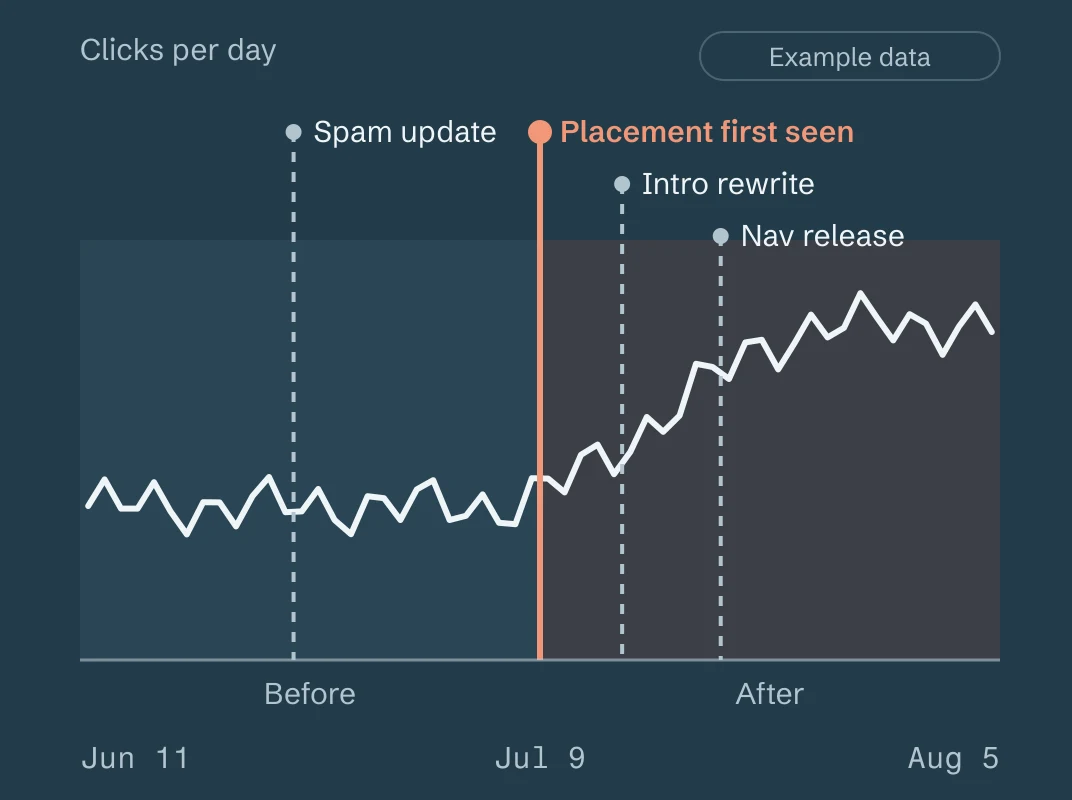
A placement chronology and a search-performance trend can sit side by side on one date axis. Read together, they can show that a page's clicks or impressions moved inside a window that also contains a placement observation. They cannot show that the placement caused the move. Search Console reports what searchers did, aggregated in ways its own documentation describes. A placement record says a link was observed on a page at a stated time. Neither one carries a cause.
This guide explains what each dataset is, what sits between them, and how to write a reading that survives a second look. It closes with an illustrative example and with what AgentLinkOps records today. Nothing here is a ranking claim, and no AgentLinkOps output attributes traffic to a backlink.
What a Search Console row is
Search Console's page and query performance data is a set of aggregated rows: clicks, impressions, click-through rate and average position, for a property, over a date window, grouped by a dimension you choose. Google documents the rules that shape those rows. Each one changes how a trend should be read.
The rows are finalized daily counts, with a lag. Google's help page says that "collected data should be available in 2-3 days." The API's dataState parameter returns only finalized data unless you ask for all, and Google says that values after the first incomplete date "may still change noticeably." So a chart that ends today ends on preliminary values, and a comparison that includes the last three days compares numbers that have not settled.
Days are California days. The same help page says the report "tracks daily data according to local time in California." A placement observation stamped in UTC and a Search Console row stamped in Pacific time can disagree about which day an event fell on.
Aggregation is by property or by page, and the two disagree. Google's performance report help states: "Data grouped by Queries, Countries, Devices, or Dates is aggregated by property. Data grouped by Pages or Search appearance is aggregated by page." The chart is aggregated by property, where "if two results from the same site appear for one query, they count as a single impression." A page table counts each page. Google's own note on discrepancies says the totals "can sometimes differ" for exactly this reason. Pick one aggregation for a before-and-after comparison and keep it.
Metrics attach to the canonical URL. Google's metrics page says "click, impression, and position data are attributed to the canonical URL of the link." If Google's canonical choice for a page changed inside your window, the page row you are reading changed its subject.
Average position is an average of a topmost result. The metric is "the average position of the topmost result from your site." A move from 8.4 to 7.1 is a shift in an average across every impression and every query in the row, and Google notes the calculation method "might change in the future."
Rows can be dropped, and top rows are not an inventory. The API reference says it "does not guarantee to return all data rows but rather top ones." The API guide on complete data is more direct: "When you group by page and/or query, our system may drop some data in order to be able to calculate results in a reasonable time." A page or query missing from a grouped result is a page or query that did not make the returned set. It is not a zero. The API also states that when date is a dimension "any days without data are omitted from the result list," so a 28-day window can come back with fewer than 28 rows. On the pages fetched for this guide, Google does not state a privacy rule for the query table; what it states is that grouped results may lose rows.
Search appearance is its own dimension. A page can move between a plain result and a feature that occupies a different position or draws a different click rate. A trend that changed because the page started or stopped appearing in a feature is a search-appearance change, and the dimension exists to show it.
The repository context tools that AgentLinkOps uses for imported rows keep each of these facts beside the row: window start and end, aggregationType, dataState, rows_returned, truncated, and days_reported beside days_requested. That is the minimum a row needs before it can be compared with anything.
What a placement chronology is
A placement chronology is the dated sequence of observations for one source page and one destination. AgentLinkOps records three results for a source check: present, absent and unknown. Each observation carries a hash of the fetched bytes, the fetch time, the HTTP status, the redirect chain, the robots posture and a standing note that JavaScript execution and visual visibility were not checked. The page's HTML never enters your repository.
Two rules keep the chronology honest. A check that cannot conclude says unknown with a named reason, and unknown never means the link was removed. Confirmed loss needs two complete absent observations at least 30 minutes apart; the last verified state and the latest attempt are separate fields on every watch, and an unknown attempt never advances the loss clock. The hosted event feed emits placement_lost only on that transition, with a before summary of the last successful observation and an after summary of the latest attempt.
So a chronology has three kinds of date on it:
- First observed present. The earliest complete read that found the link. The link may have existed earlier; you were not looking.
- Last observed present, then confirmed missing. The window between the last positive read and the second complete absence. The removal happened somewhere inside it.
- Unknown stretches. Days when checks ran and could not read the page. The state during those days is unknown, and a chart should show a gap, not a line.
The verification guide covers reading one observation. The monitoring checklist covers the record around it. What matters here is that a chronology is a set of intervals with evidence, and each interval is wider than the check that produced it.
What sits between a placement and a trend
A backlink is one input among many to a ranking system nobody outside Google can observe. Between the day a link appears and the day a row changes, all of the following can move the row on their own.
| Confounder | What it does to the row | How to check for it |
|---|---|---|
| Seasonality | Impressions rise and fall with the calendar. Google's traffic-drop guide asks you to make sure a change is "not a drop that happens every year due to a festivity or a trend." | Compare the same dates a year apart, and read the query rows for seasonal terms |
| Ranking updates | Google publishes dated ranking updates. On September 15, 2026 its status dashboard listed an "August 2026 spam update" dated 18 Aug 2026 and a "May 2026 core update" dated 21 May 2026. | Mark every published update inside your window on the same axis |
| Content changes on your page | A rewritten title, a new section or a changed intro shifts which queries the page earns and how it is clicked. | Keep a dated log of edits to the destination page; your git history is one |
| Canonical changes | Metrics follow Google's canonical choice. A new canonical moves the numbers to another row. | Compare the page row to the URL-prefix total; check the URL in Search Console's inspection tool |
| Other links | Any other page that started or stopped linking inside the window. A supplier export is a sample; Google's Links report is a sample. | Date every placement you know about, and label the set as partial |
| Internal linking | A new hub or navigation slot that points at the page changes its crawl and its context. | Log site-structure releases with dates |
| Search feature changes | A result that gains or loses a feature changes its position and click rate without any change to the page. | Group the page by search appearance and compare the two windows |
| Aggregation and freshness | A switch from property to page aggregation, or a window that includes preliminary rows, produces a "change" that is an artefact. | Fix aggregation and dataState: final before comparing anything |
Any one of these is enough to produce the move you are looking at. Several of them usually overlap. A reading that names the confounders it checked is worth more than a reading that reports a percentage.
The honest reading
Here is the reading that holds up. It has four parts.
Name the association window. State the placement interval (first observed present to last observed present, or to confirmed missing) and the search window you are comparing. Say which one is wider. A placement first observed on the 10th and a search rise on the 3rd are not in the same window, and the reading ends there.
Compare equal windows with fixed conditions. Two windows of equal length, contiguous or aligned a year apart, in the same aggregation, with dataState: final, with days_reported shown for each. The AgentLinkOps context tools refuse to compute a delta between unequal or overlapping windows, because weekly seasonality turns those numbers into decoration. A before-and-after table always shows the denominator: clicks per 28 days, impressions per 28 days, days reported out of days requested.
Bring a comparison set. Pick a few pages on the same site that received no placement in the window, ideally on nearby topics. If they moved the same way, the move belongs to the site or to the calendar, not to the page. If they did not, you have an association worth writing down. You still do not have a cause.
Write three labelled sentences. The context contract requires each output to keep observation, inference and recommendation apart, and a report about a placement should do the same. Observation: what the rows say. Inference: what might explain them, with the confounders checked and the ones not checked named. Recommendation: what to do next. A sentence such as "the guest post lifted this page from position 12 to 8" merges all three and drops the confounders, and it is the sentence this guide exists to replace.
Why can one link never be credited on its own? Because the comparison that would isolate it does not exist. You cannot observe the same page in the same window without the link. Every other input moved at the same time, and the search data you hold is an aggregate with dropped rows and a lag. The most a chronology and a trend can say together is: this placement was present during a window in which this page's rows moved this way, after these confounders were checked. That sentence is useful. It sets a date to look at when the numbers move again, and it tells the next reader what was ruled out.
An illustrative example
Every number below is made up. The pages, dates and figures do not belong to any customer, and the example exists only to show the shape of a reading.
Suppose a destination page /guides/equipment-inspection/ and a placement on a trade association's resource page. The chronology from the ledger:
| Date (UTC) | Observation | Evidence |
|---|---|---|
| 2026-07-02 | unknown, reason possible_render_required | Page read, no anchors found, script-heavy body |
| 2026-07-09 | present, anchor "equipment inspection checklist", rel none | sha256 recorded, complete read |
| 2026-07-16 to 2026-08-27 | present on each weekly check | seven complete reads |
| 2026-09-03 | present | complete read |
First observed present is July 9. The July 2 unknown is a gap, not an absence: the page may have carried the link a week earlier. The placement interval for this reading is July 9 to September 3, and it is still open.
Search Console rows for the destination page, aggregated byPage, dataState: final, retrieved through a connector handoff on September 8 with the window boundaries kept:
| Window | Days reported / requested | Clicks | Impressions | Average position |
|---|---|---|---|---|
| Before: 2026-06-11 to 2026-07-08 | 26 / 28 | 41 | 2,180 | 14.6 |
| After: 2026-07-09 to 2026-08-05 | 28 / 28 | 63 | 2,910 | 11.9 |
Two days are missing from the before window, so the before total covers 26 reported days, and the per-day rate is the fair comparison: about 1.6 clicks per reported day before, 2.25 after. The same table for three comparison pages on the site that received no known placement:
| Comparison page | Clicks before / after | Impressions before / after | Average position before / after |
|---|---|---|---|
/guides/rental-agreements/ | 58 / 61 | 3,040 / 3,120 | 9.8 / 9.6 |
/guides/damage-deposits/ | 22 / 24 | 1,410 / 1,390 | 16.2 / 16.4 |
/guides/pickup-condition-form/ | 37 / 55 | 1,980 / 2,640 | 12.7 / 10.8 |
Confounders checked, in the log: the destination page's intro was rewritten on July 14, five days into the after window; the site's navigation gained a "Guides" menu on July 20 that links all four pages; no ranking update fell inside either window on the published list; the canonical URL was unchanged in both windows; the search-appearance grouping shows the page appeared in a rich result on 9 days in the after window and 0 days before.
The three labelled sentences:
- Observation. Clicks per reported day for the destination page rose from about 1.6 to 2.25 across two aligned 28-day windows, in page aggregation on final data. One of three comparison pages rose by a similar share; two were flat.
- Inference. The placement, an intro rewrite, a navigation change and a new rich-result appearance all fall inside the after window. The navigation change reached all four pages and only two rose, so it does not explain the move by itself. The rich-result appearance is a plausible driver of the click rate and it began after the rewrite. Nothing in this data separates the link from the rewrite or the appearance change.
- Recommendation. Keep the placement monitored, log the next content edit with a date, and re-read the same two windows a year apart before writing anything about the link. No outreach follows from this reading.
Notice what the example refuses to say. It does not say the placement moved the page. It does not report a percentage without the days behind it. It does not treat July 2 as "no link." And it names the two changes it cannot separate.
What AgentLinkOps does today, and later
Today. The placement side of this reading is the product's monitored dataset: dated observations, the two-absence loss rule, evidence hashes, a resumable event feed and an export of monitored placements for your own records. The local ledger is plain JSONL in your repository; cloud sync mirrors it and never writes back into it. Cloud sync and the hosted event feed need a token and a configured cloud origin, and hosted access is invitation-only.
The search side is local and manual. The repository context tools run on a separate local host, read manual inputs, and import a Search Console handoff your own connector produced, keeping who retrieved it, the window and the aggregation beside every row. The capability status page states the boundary in one line: "Google context: manual inputs and imported snapshots work locally. A direct Google connection requires separate authorization and acceptance. Missing rows never mean zero impressions." No AgentLinkOps surface attributes clicks to a backlink, present or hypothetical; the contract those tools implement forbids it.
Later. A hosted, read-only Google connection is planned and not built. The DP-0023 claims ledger records it as "planned, not built," and the source contains a read-only client shape and fixture tests, not a customer-facing connection. No date is promised here. Google's API also has no endpoint for the Links report, so no version of that connection would feed links data; links still arrive only through the file export the Search Console import reference describes, and only in the per-placement layout.
The monitoring hub covers what a single check can and cannot conclude, and the event sync guide shows how the chronology reaches your records. If you are watching a competitor's inventory rather than your own placements, the competitor monitoring guide separates dataset events from page observations, which is the same discipline applied to someone else's links.
Sources
- Search Analytics: query · Google Search Console API documentation · 2026-08-11
- Query your search traffic: all your data · Google Search Console API documentation · 2025-08-28
- About Search Console data · Google Search Console Help · Not stated; accessed September 15, 2026
- Performance report (Search results): Overview and basic setup · Google Search Console Help · Not stated; accessed September 15, 2026
- What are impressions, position, and clicks? · Google Search Console Help · Not stated; accessed September 15, 2026
- Debugging drops in Google Search traffic · Google Search Central · 2025-12-10
- History for Ranking · Google Search Status Dashboard · Accessed September 15, 2026
- Capability status · AgentLinkOps documentation · 2026-09-15